Products / Pulsar Hell
Pulsar Hell
Pulsar Hell builds sound from streams of short grains. One mechanism spans steady pitched tones, formant-rich textures, rhythmic pulse trains, granular clouds and dense noise.
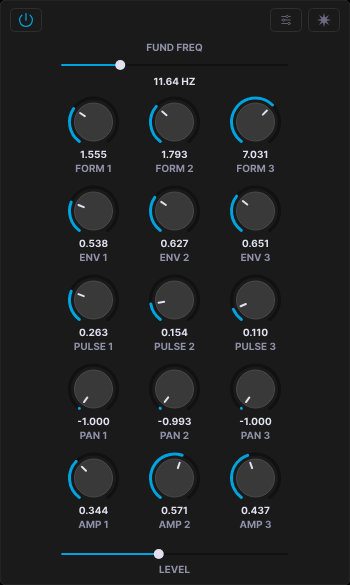
The window at 1200 × 800, drawn at 1:1.The core column of one train at 1:1.
Overview
01
Pulsar synthesis
Sound is a train of pulsars: brief events emitted at a controllable rate. Each pulsar has two parts. The pulsaret is a waveform that loops inside the grain. The envelope plays once and sets the grain's length and shape. The output is their product.
Fund freq sets how often grains fire; in the audio range they fuse into a pitched tone. Formant sets how fast the pulsaret is scanned inside each grain, so tone color moves independently of pitch.
Note
Pulsar Hell triggers itself. It sounds as soon as it is on a track and needs no MIDI notes. Note messages are ignored.
Grain length is 1 / (fund × formant × env) seconds, and each grain holds about 1 / env pulsaret cycles. At ENV 1.0 the pulsaret is read through exactly once per grain.
Trains
02
Four independent trains
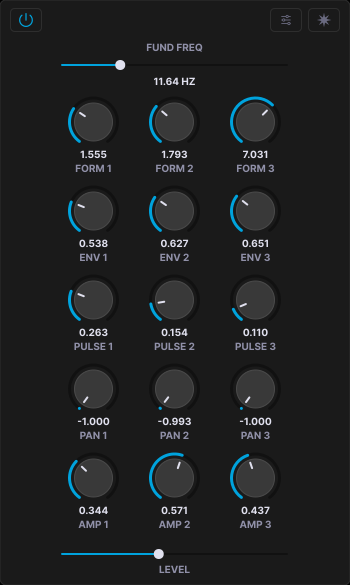
Pulsar Hell runs four complete pulsar trains, PULSAR 1 to 4. All four sound at the same time; the tabs only choose which one you view and edit. Trains never affect each other in the engine. They meet only at the mixer.
Each train has its own pulsaret and envelope, fundamental, modulation matrix, FM and flux, masking, Fourier and wavelet state, sieve pattern and channel routing.
Note
The power button disables a train entirely, which also frees its processing load.
Three groups per train
Inside a train, three independent groups scan the same pulsaret and envelope. Each sets its own FORM, ENV, PULSE, PAN and AMP. The groups are not linked or synced, so one train layers three formant-shaped voices from one source.
Note
PULSE is not pulse width. It delays when a group's grain fires after the shared trigger, by up to one second, staggering the three groups in time.
Masking and modulation
Every trigger passes three gates in order: probability, then burst and rest, then the sieve pattern. A rejected trigger silences all three groups.
FM sets each grain's playback rate at the moment it spawns, so pitch varies across grains rather than within them. Mode B subtracts instead of multiplies, and grain rates can go negative for backward playback. FLUX adds random jitter to density and pitch.
Note
RATIO sets how fast FM cycles, not whether it runs. At RATIO 0 the FM amount still shifts grain rate by a fixed ratio, and FLUX is independent of both.
Tables
03
Wavetable system
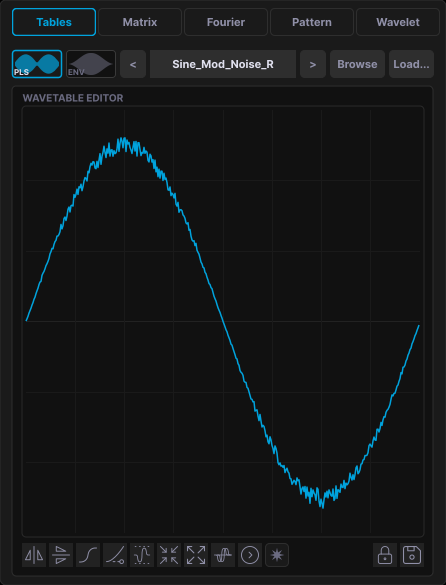
Every train reads one pulsaret and one envelope, both wavetables of 2048 samples. 912 factory wavetables in 31 categories, including Analog, Chaos, FOF, Glottal, Oto, Superformula and Window. A browser with search and waveform thumbnails loads a table on click.
Your own WAV, AIFF and FLAC files load as wavetables. Up to 65,536 samples are read and resampled to 2048 with linear interpolation, loaded as they are: no normalization, no DC removal. Originals are never modified.
Draw directly on the canvas, or apply transforms. Transforms accumulate, so their order matters. Lock keeps a table when you load presets. Save writes it to your User folder.
Note
Factory content is about 93 MB: 912 wavetables in 31 categories and 87 presets. Each plugin format is about 14 MB.
Editor transforms
Reverse
Flip front to back
Invert
Flip polarity
Smooth
Cosine taper at the edges
Fade
Welch window to zero
Normalize
Scale to full peak
Shrink
Compress to half width
Expand
Stretch to double width
Fold
Wavefold at ±0.7
Rotate
Phase shift by 90°
Matrix
04
Modulation matrix
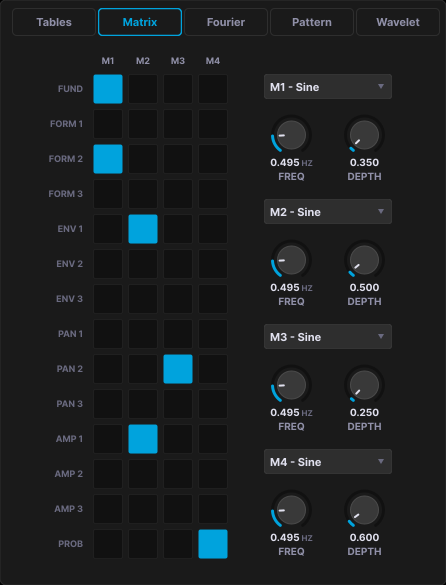
Four modulators, M1 to M4, route to 14 targets: Fund, FORM 1 to 3, ENV 1 to 3, PAN 1 to 3, AMP 1 to 3 and PROB. Click a cell to connect. One modulator can drive many targets, and several can sum onto one. Each has a rate from 0.001 to 150 Hz and a depth from 0 to 10.
Types are Sine, Saw, Square, Triangle, S&H, and four chaotic or stochastic sources: Latoocarfian, Gendy, Henon and Lorenz. Modulation is bipolar for fundamental, formant and envelope, attenuating for pan and probability, and multiplicative for amplitude.
A separate loop engine reads wavetables as automation curves. It sweeps over 0.3 to 120 seconds in Forward, Reverse, PingPong, Random or Drunk direction, and modulates fundamental, probability, FM, flux and the per-group parameters.
Note
A modulator only acts where a cell in its column is on and its DEPTH is above zero.
Fourier
05
Fourier editor
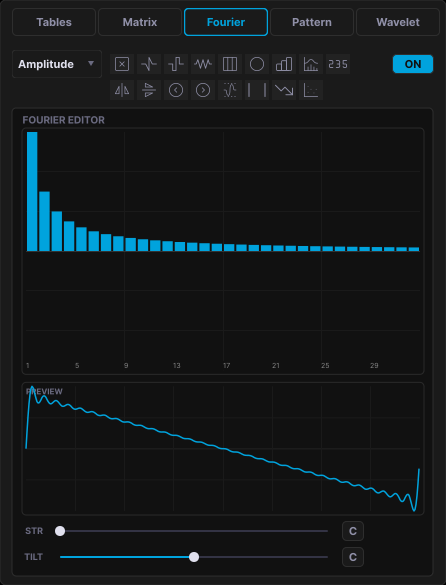
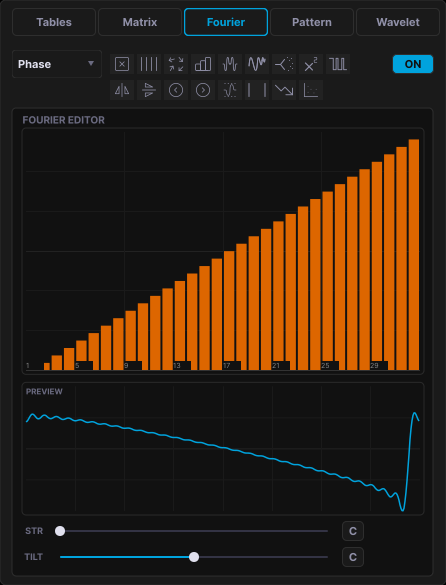
An additive editor that builds the pulsaret from 32 harmonics. Draw amplitude and phase by hand, with a preview of the waveform as you go. Turning it on captures the current pulsaret and renders the spectrum into it; turning it off restores the captured table, so you can compare without losing the original.
Generators replace the spectrum. Modifiers such as Decay, Thin, Scatter and Rotate reshape it. In Phase mode, presets redistribute phase without changing the amplitude spectrum. STR pushes partials off integer ratios, TILT brightens or darkens, and each can cycle on its own triangle LFO from 0.5 to 30 seconds.
Note
Phase changes the waveform and its peak level, not its spectrum. Two patches can sound alike with very different headroom. Schroeder phase gives the lowest peaks.
Amplitude generators
Saw
All harmonics at 1/k
Square
Odd harmonics at 1/k
Triangle
Odd harmonics at 1/k²
Pulse
All harmonics equal
Formant
Vocal resonant peaks
Bright
Rising toward high harmonics
Hollow
Even harmonics only
Prime
Prime-numbered harmonics only
Phase presets
Zero
All phases at 0
Linear
Linear phase ramp
Random
Static random phases
Alternating
Alternating 0 and π
Schroeder
Minimum crest factor
FM phase
Sinusoidal phase modulation
Logistic chaos
Chaotic distribution
Quadratic
A frozen chirp
Bit crush
Quantized to 0 or π
Pattern
06
Pattern editor
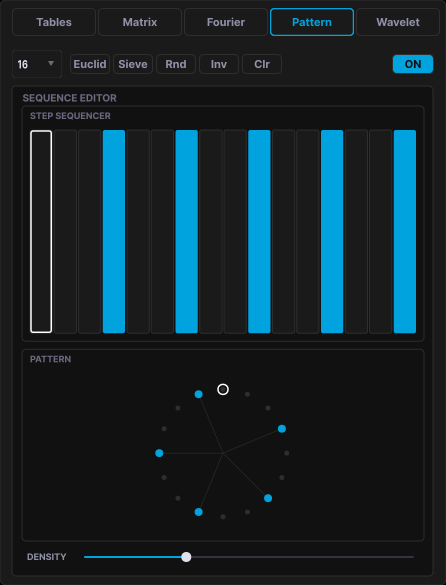
A step sequencer based on Xenakis sieve theory, which builds rhythms from residue classes rather than by hand. The pattern is the third masking gate, after probability and burst and rest. With the sieve on, each trigger consumes one step. Grains fire only on active steps.
Length of 8, 16 or 32 steps. Euclid spaces hits evenly, Sieve builds a structured pattern at the chosen density, Rnd fills at random. Inv and Clr invert or clear. Any step can be edited by hand. A circular view draws the same pattern around a ring, which shows its rotational symmetry.
Note
Give two trains different step counts and fundamentals, and their patterns drift against each other.
Wavelet
07
Wavelet editor
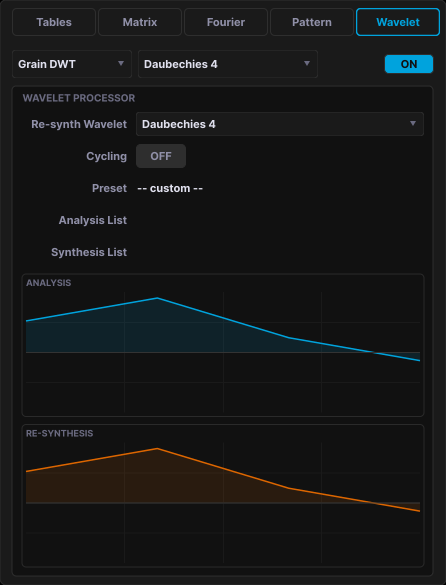
A discrete wavelet transform stage. Grain DWT processes the train's output in fixed 1024-sample frames, decomposing with one wavelet and reconstructing with another; the mismatch recolors the sound. With Cycling on, each trigger advances one entry through the analysis and synthesis lists.
Stream DWT processes the continuous output in buffers of 256 to 4096 samples, with ten coefficient operations including Bin Rotation, Magnitude Freeze, Per-Scale EQ, Scale Swap and Threshold Gate. The library holds more than 50 wavelets across the Daubechies, Haar, B-spline and Coiflet families.
Note
Larger buffers resolve frequency more finely and add latency. Stream DWT at large buffer sizes adds measurable processing load.
Morph
08
Morph
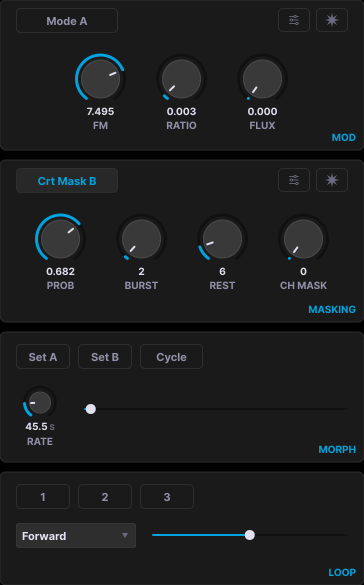
Morph is per train. Each train crossfades between two captured snapshots of its own, Set A and Set B, with its own Cycle and Rate; the cycle period runs from 0.1 to 60 seconds. Morphing one train never affects another.
Loading a preset clears that train's snapshots. Morph never touches the mixer or the power buttons: master volume, mute and limiter, and every train's Level, mute, limiter and Enable stay under your control throughout.
- 01
Dial in a sound and press Set A.
- 02
Change it and press Set B.
- 03
Move the Morph slider, or turn on Cycle to sweep back and forth.
Note
The Morph slider and cycle controls can be automated from the host, per train. Capturing Set A and Set B is a manual action.
Output
09
Eight discrete outputs
The output bus has 8 discrete channels with no fixed speaker assignment. Each train chooses its own channel count on the mixer: 2, 3, 4, 6 or 8.
Grains are placed around a ring of channels with equal-power panning. CH MASK cycles successive grains through positions, and the four trains sum channel for channel.
Mixer

Each strip has a level fader, mute, solo, and per-channel peak meters with peak hold. The master section adds global volume, mute, and a lookahead limiter that is off by default.
In Reaper, raise the track's channel count to 8. To send channels to another application, route through a virtual multichannel device such as Loopback.
Note
Only the channels your host provides are output. Set the track or bus width to match the train's channel count.
Window
10
The window
The whole instrument lives in one fixed window: top bar, three columns, and the mixer. The right column switches between five tabs; the window itself is at the top of this page.
Specs
11
Formats and requirements
Pulsar Hell is a macOS product. All three formats share the same engine, presets and wavetables.
Pricing
12
Price, pre-order and download
Pulsar Hell is not released yet. It is $150 USD, and pre-orders open before release. Payment is handled by Lemon Squeezy as merchant of record, and licence terms are set out in the end user licence agreement. Refunds are covered by the refund policy.